Credits and license
How to check your account's credit balance, what additional movements are, and how paid extra services work.
Your Qube subscription is annual and runs on credits: when you pay for the license renewal you receive 365 credits, one for each day of the license year. Every day that passes automatically uses up one credit, no matter how much you actually use the app.
If our team provides you with a service outside the normal license — like the assisted import of an Excel price list that's too complex to fix on your own — we may charge you additional credits, on top of the automatic daily consumption, which brings your available balance down faster.
You can check your credits at any time from the dedicated “Crediti” (Credits) section in your user menu (click your name in the top left) — visible only if you administer the account.
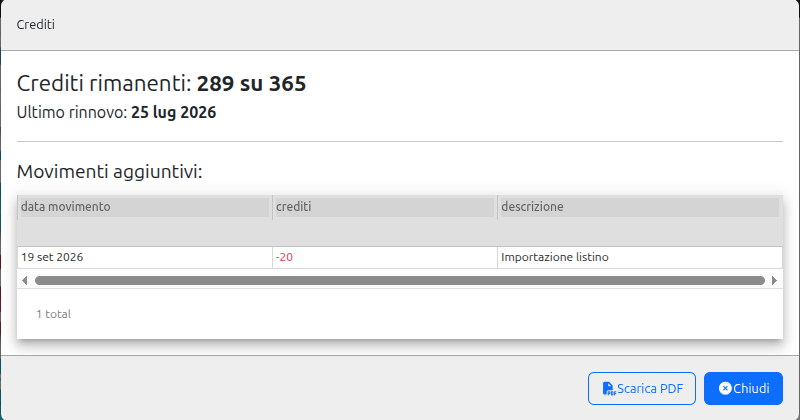
The Credits window shows how many credits you have left out of the yearly total (for example “289 su 365”, i.e. 289 of 365), the date of the last renewal, and a “Movimenti aggiuntivi” (Additional movements) table with any extra charges — each with a date, a credit amount and a description. That's exactly where you'd see, for example, the charge for an assisted import: it shows up as a movement with a negative amount and the description “Importazione listino” (Price list import).
The “Scarica PDF” (Download PDF) button lets you save a statement of your credits. If your balance is running low, a red “Licenza in scadenza” (License expiring) warning also appears on the home dashboard and opens the same window. Only users authorized to renew the license can see this information.
If you need to renew your license or request an extra service like assisted import, contact Qube support.
- 1Click your name in the top left.
- 2Select “Crediti” (Credits) from the menu (visible only if you administer the account).
- 3Check the “credits remaining out of total” balance and the last renewal date.
- 4Scroll the “Movimenti aggiuntivi” (Additional movements) table for any extra charges, such as an assisted import.
- 5If you need a summary document, click “Scarica PDF” (Download PDF).